Device-Level Message Settings for Comtrol Devices
Stay - Comtrol integration is enhanced to allow users to configure the message types supported by individual devices. This provides users with the control over the messages that are sent to and accepted from each device.
A new flag, Use Device-Level Message Settings, has been added to the Device Registry tab of the On-Premise Settings screen (Interfaces ➜ On-Premise Settings ➜ Device Registry). This flag is disabled by default. When enabled, users can select the specific message types supported by the device. Only the selected message types are processed for that device.
When the Use Device-Level Message Settings flag is disabled, the existing behavior remains unchanged. Message types configured at the interface level are applied to all applicable devices.
When the Use Device-Level Message Settings flag is enabled, only the message types enabled in the device-level configuration are processed for the selected devices. Device-level message settings override the interface-level message configurations.
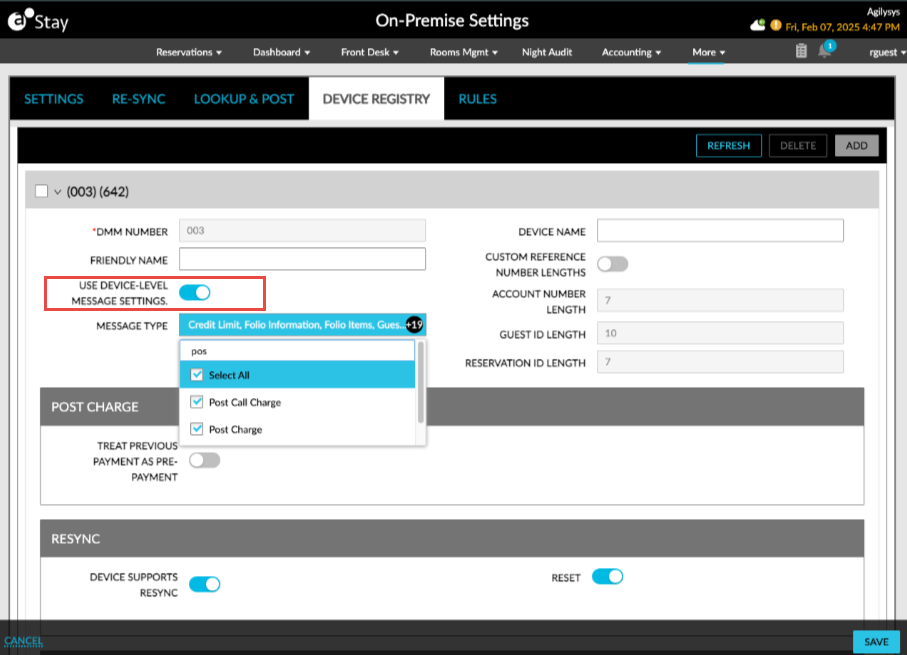
For non-fleet properties, the Use Device-Level Message Settings flag and Message Type drop-down list are hidden when the Supports Included DMMs DFID 381 flag is disabled in the Comtrol interface (Interfaces ➜ Cloud Settings ➜ Settings). This restriction does not apply to Fleet properties.
Message Type Selection
The message types displayed in the Message Type drop-down list are based on the messages supported by the Comtrol interface or, for shared devices, the LLCC configuration (Interfaces ➜ On-Premise Settings ➜ Shared Interface). Message types that are not available in the interface or LLCC settings are not displayed for selection and are not sent to the device.
Users can select from the following message types:
-
Credit Limit
-
Folio Information
-
Folio Items
-
Guest Language
-
Guest Message
-
Guest Name
-
Guest Status
-
Maid Code
-
POST Charge
-
POST Call Charge
-
POST POS Charge
-
Restore Guest
-
Restrict Movie
-
Restrict Phone
-
Resync
-
Room Check-in
-
Room Move
-
Room Checkout
-
Self-Checkout
-
Guest Reservation
Parking, Message Count, and Key Create messages are not available for device-level selection.
Message Processing
When device-level message settings are enabled, only the message types selected for the device are sent to that device. Messages for unsupported message types are not directed to the device.
When device-level settings are disabled, applicable messages enabled for the Comtrol interface continue to be sent to the devices.
For incoming messages, only message types selected for the device are accepted. Other message types can be rejected.
Additional Operation Settings
Two additional settings sections have been added to the Comtrol interface based on the message types supported by the device:
-
Post Charge: This section includes the Treat Previous Payment As Pre-Payment flag and is displayed only when Post POS Charge and Post Charge message types are available. This flag supports the following functionality:
-
Enabled: Ignores the prepayment amount included in the POS Post Charge or Post Charge requesst when posting the charge.
-
Disabled: Excludes the prepayment amount from the charge and posts only the remaining charge amount.
-
-
Resync: This section includes the Restrict Checkout For Key Device flag and is displayed only when the Resync message type is available. This flag supports the following functionality:
-
Enabled: Restricts checkout when the key device operation cannot be completed.
-
Disabled: Does not restrict checkout based on the key device operation.
-